ShopDreamUp AI ArtDreamUp
Deviation Actions



Description
::EDIT::
PLEASE note that I have moved to a new account ( ) so if you wish for me to look at something you've created with the brushes you'll have to leave me a note or a message there as I wont be checking this account very often! Thanks for all your lovin' and favourites guys!
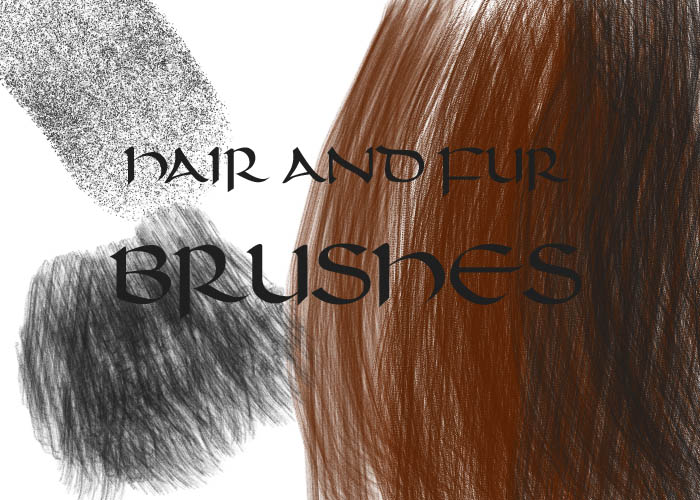
Just some handy brushes I made Good for doing hair or fur the easy way but it looks even better if you add some of your own individual strokes into the mix.
Short tutorial of sorts will come next.
With the short fur brush be careful how you use it or it may look funny (because the brush has gaps, painting over part of an area you painted with the brush already will fill in some gaps etc)
How to install:
1. Click "Download As"
2. Go to "My Computer" -> Then to your main Hardrive (Usually "Local Disk (C: )") -> "Program Files" -> "Adobe" -> "Photoshop" -> "Presets" -> "Brushes" -> "Adobe Photoshop Only"
3. Save
4. Open Photoshop and select the Brush tool then right click. Then click that arrow in the top right corner of the window that appears and go to "Load Brushes" and select "Hair and Fur Brushes" from the list
NOTE: To use these brushes in painter simply change the file extension (The file is called "Hair and Fur Brushes.abr") from .abr to .jbr.
Any problems please note me.
.: PLEASE GIVE CREDIT :.
Either Link back to this page or link back to my page by typing in :icon(remove this)arwenpotter: in your Deviation Description. Thank you.
PLEASE note that I have moved to a new account (
) so if you wish for me to look at something you've created with the brushes you'll have to leave me a note or a message there as I wont be checking this account very often! Thanks for all your lovin' and favourites guys! Just some handy brushes I made
Good for doing hair or fur the easy way but it looks even better if you add some of your own individual strokes into the mix.Short tutorial of sorts will come next.
With the short fur brush be careful how you use it or it may look funny (because the brush has gaps, painting over part of an area you painted with the brush already will fill in some gaps etc)
How to install:
1. Click "Download As"
2. Go to "My Computer" -> Then to your main Hardrive (Usually "Local Disk (C: )") -> "Program Files" -> "Adobe" -> "Photoshop" -> "Presets" -> "Brushes" -> "Adobe Photoshop Only"
3. Save
4. Open Photoshop and select the Brush tool then right click. Then click that arrow in the top right corner of the window that appears and go to "Load Brushes" and select "Hair and Fur Brushes" from the list
NOTE: To use these brushes in painter simply change the file extension (The file is called "Hair and Fur Brushes.abr") from .abr to .jbr.
Any problems please note me.
.: PLEASE GIVE CREDIT :.
Either Link back to this page or link back to my page by typing in :icon(remove this)arwenpotter: in your Deviation Description. Thank you.
© 2006 - 2024 arwenpotter
Comments390
Join the community to add your comment. Already a deviant? Log In
unable to download